
ATS Integrations: How to Connect Your Recruiting Tech Stack
Recruit
Applicant Tracking System
11 min read
Key Highlights
ATS integrations move candidate and job data between recruiting tools instead of relying on repeated manual entry.
Job boards, HRIS, payroll, e-signature, and background checks are common starting points for connected hiring workflows.
Native connectors simplify setup, while APIs and webhooks support more customized data flows.
Integration security should cover permissions, encryption, SSO, data minimization, auditability, and third-party controls.
The best first integration solves your most costly or error-prone hiring handoff rather than expanding your connector count.
Introduction
If you already use an ATS, applicant tracking system integrations help you understand what other recruiting and HR tools it can connect with and whether those connections are worth setting up.
The right integrations can link your ATS with job boards, HRIS and payroll systems, e-signature tools, background check providers, and communication platforms, so candidate and job data move more efficiently across your hiring workflow.
This article explains the main ATS integration categories, gives practical examples of how they work, and shows how to decide which connections to prioritize first.
What Is ATS Integration?
ATS integration connects an applicant tracking system with other recruiting, HR, or business software. It allows information to move between systems without repeated manual entry.
Common connections include job boards, HRIS, payroll platforms, e-signature services, background-check providers, and collaboration tools.
These connections use native ATS software connectors, APIs, or webhooks, with native connectors providing prebuilt connections between systems.
Among these methods, event notifications complement APIs by notifying another system when an event occurs, such as a candidate being hired or an offer being updated or accepted.
Workato's current ATS integration guide similarly describes integrations as connections that keep ATS data synchronized with applications such as HRIS, e-signature, business communication, and onboarding tools.
The important part is the candidate data flow.
Before connecting systems, define which one owns each record, what data should move, and whether the sync should be one-way or bidirectional, so automation improves the handoff instead of creating conflicting data.
Why ATS Integrations Matter
The strongest ATS integration benefits come from removing repetitive handoffs between the systems recruiters already use.
Without those connections, the same candidate name, status, job information, interview outcome, or hire data may need to be copied into several applications, creating extra work and more opportunities for conflicting records.
Integration also reduces unnecessary tool switching. For example, LinkedIn's current Hiring Integrations documentation reports that recruiters using Recruiter System Connect can save up to 3.5 hours per week, by reducing switching between LinkedIn Recruiter and supporting ATS platforms.
Those efficiencies can support time-to-hire reduction, but speed should be treated as the result of a better workflow rather than the purpose of integration itself.
A well-designed connection also keeps candidate information current, makes hiring activity easier to follow, and reduces delays at moments such as application review, offer approval, and onboarding.
This makes integration capabilities worth considering when comparing the best applicant tracking systems. The strongest platform is not simply the one with the longest feature list; it should also connect effectively with the systems your hiring team already depends on.
The same principle applies across the wider recruiting tech stack. Each connection should remove a meaningful break in the workflow rather than adding automation simply because a connector exists.
“Real workflows require orchestration across systems, data, and rules that reflect how businesses actually operate.”— Nam Le, SVP & GM, Workato
See What Mercury Recruit Already Connects To
Check its current integrations against your hiring stack.
Common ATS Integration Categories with Examples
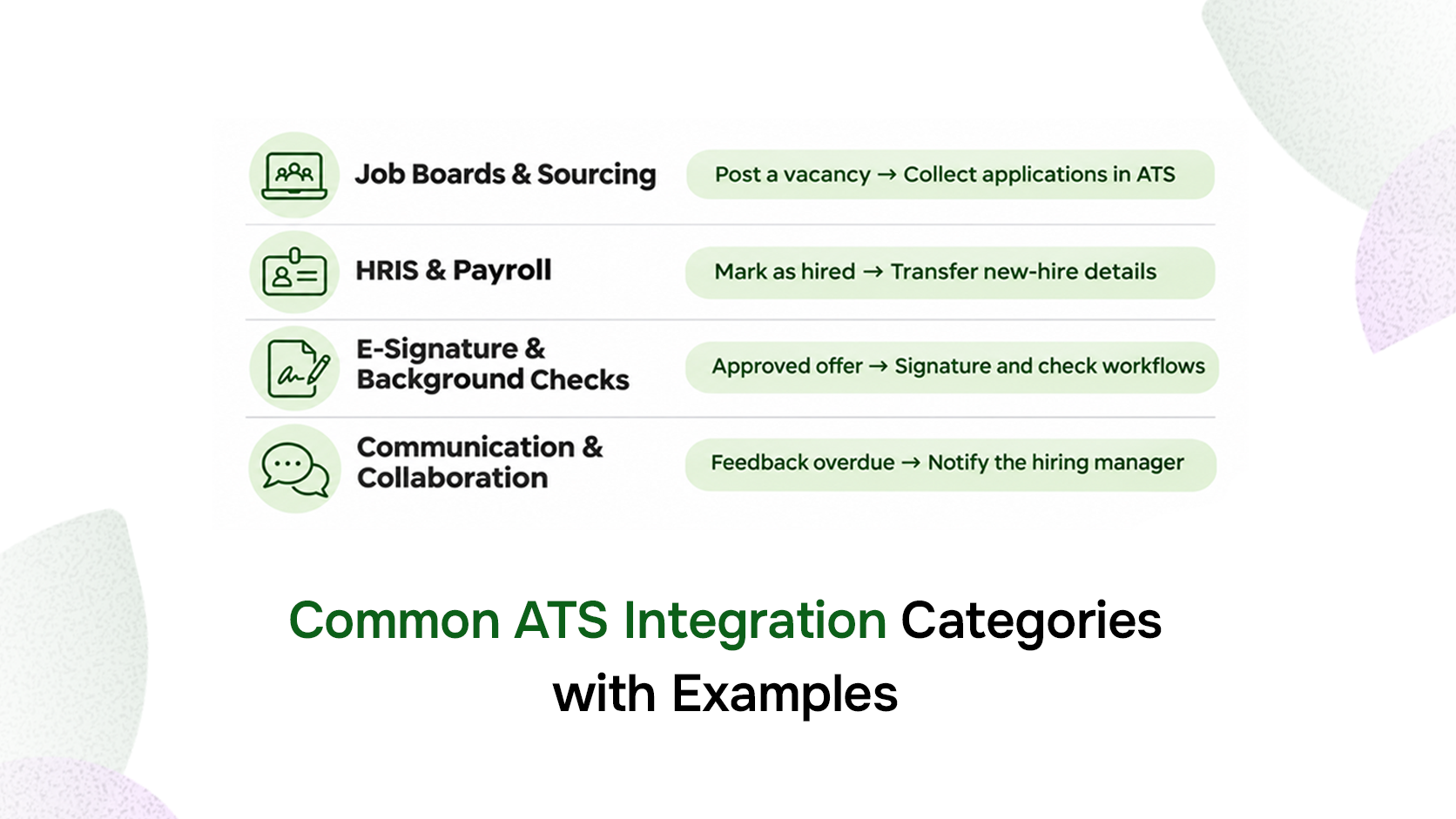
ATS integrations become easier to understand when they are organized around hiring handoffs rather than software categories alone.
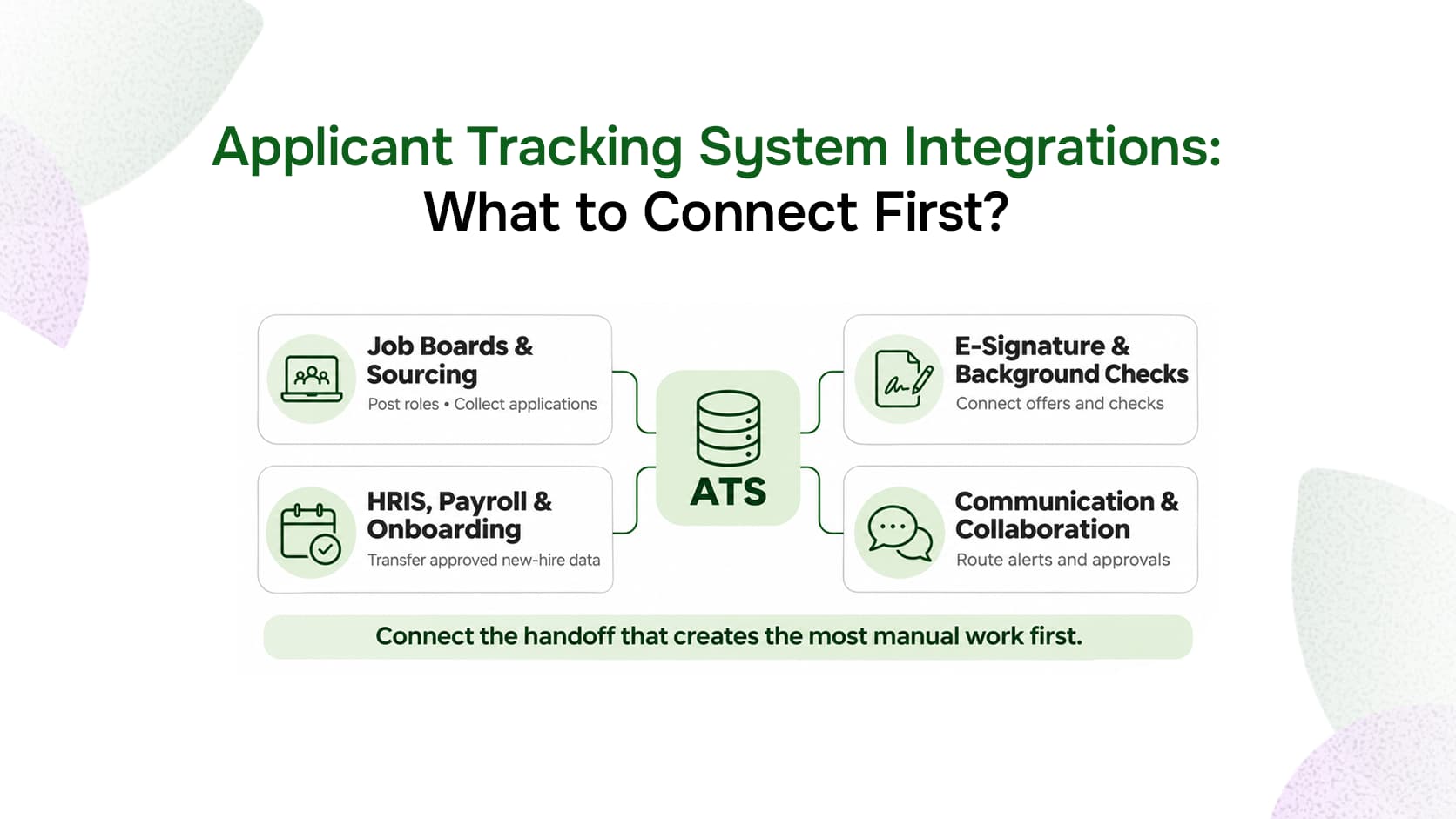
The four groups below cover the points where candidate and job information commonly needs to move into or out of the ATS.
1. Job Boards and Sourcing
An ATS integration with job boards connects job distribution and applicant collection, so recruiters do not need separate processes for posting roles and transferring applications back into the ATS.
For example, job board syndication can send an approved vacancy to supported channels while returning candidate applications, source information, and status data to the recruiting system.
LinkedIn offers ATS-connected hiring products, while Indeed's ATS Sync transfers job and candidate information between Indeed and connected platforms.
Indeed currently states that it integrates with more than 350 ATS platforms globally, showing how established this integration category has become.
The practical benefit is not merely one-click posting. The stronger workflow keeps the ATS as the working record while reducing duplicated candidate profiles, manual downloads, and incomplete source data.
“If you’re not using the Indeed integration, you’re missing out. It’s been a critical tool in helping us achieve our hiring goals efficiently.”— Matthew Oldham, Senior Talent Acquisition Partner, RHA Health Services
2. HRIS and Payroll
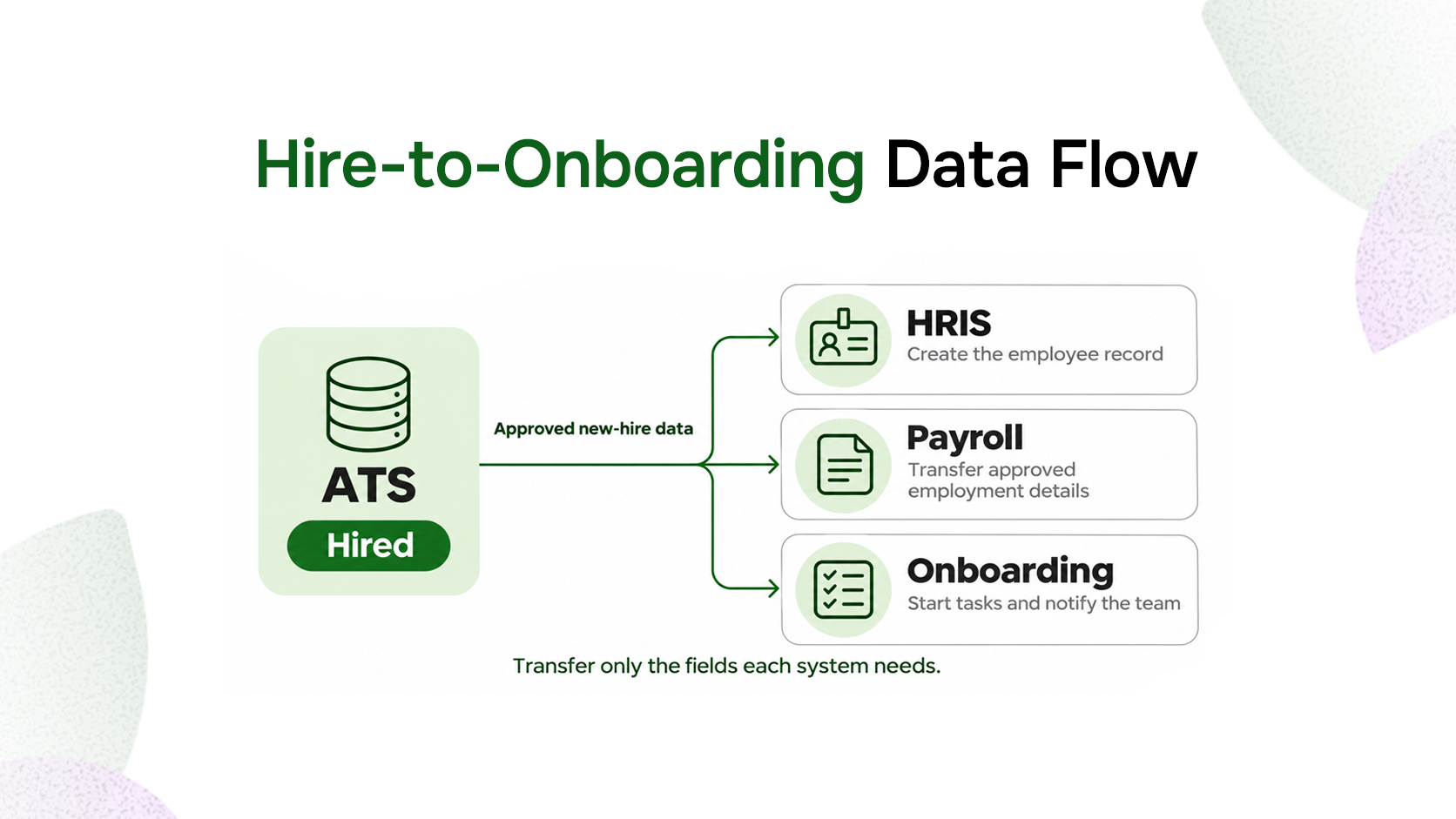
ATS integrations for HRIS become important at the point where a successful candidate stops being an applicant and becomes an employee.
Instead of entering the same personal and job information again, a controlled HRIS integration can transfer the fields required for the employee record.
The next connection is often payroll. An ATS and payroll integration or downstream payroll system sync can pass approved employment information into the appropriate system once the hiring process reaches a defined stage.
The exact fields should be limited to what the destination genuinely requires.
This hire-to-employee handoff is also where an ATS onboarding integration becomes useful.
Changing a candidate to “Hired,” for example, can trigger onboarding workflow automation such as creating an employee record, starting provisioning tasks, or notifying the team responsible for the new hire.
A reliable workflow still needs ownership rules. Decide whether the ATS or HRIS becomes the source of truth after hire, how duplicate records are handled, and whether changes made downstream ever need to sync back.
Cut the Manual Handoffs Between Stages
Automate repetitive recruiting tasks from application to hire.
See Automation3. E-Signature and Background Checks
An e-signature integration connects the offer stage with a signing platform, so an approved candidate record can populate the relevant offer or employment document without recreating the information manually.
A typical workflow might generate an offer after an approval status is reached, send it for signature, and update the ATS once the document is completed.
An ATS integration with background checks follows a similar event-driven pattern.
Rather than asking a recruiter to enter candidate details into another portal, a signed offer or approved status can trigger a background check integration, subject to the organization's process, consent requirements, and the capabilities of the connected provider.
The important design choice is when the trigger should happen. Starting a check too early, sending unnecessary candidate information, or failing to return the result to the correct record can create more problems than the automation solves.
4. Communication and Collaboration Tools
A business communications integration with tools such as Slack or Microsoft Teams can bring selected recruiting notifications and actions closer to where hiring managers already collaborate.
For example, a workflow might alert an interviewer that feedback is overdue, notify an approver about an offer, or send a hiring-stage update to the appropriate private channel.
These connections should not turn chat platforms into a second candidate database. Keep sensitive candidate information in the system designed to manage it, and use communication integrations for targeted notifications, approvals, or links back to the authoritative record.
That distinction preserves the human value of collaboration while removing unnecessary administrative movement between tools.
“The most important value a recruiter brings is their ability to connect with people.”— Joey Quaranti, Talent Strategy & Ops, Carta
How to Keep ATS Integrations and Candidate Data Secure
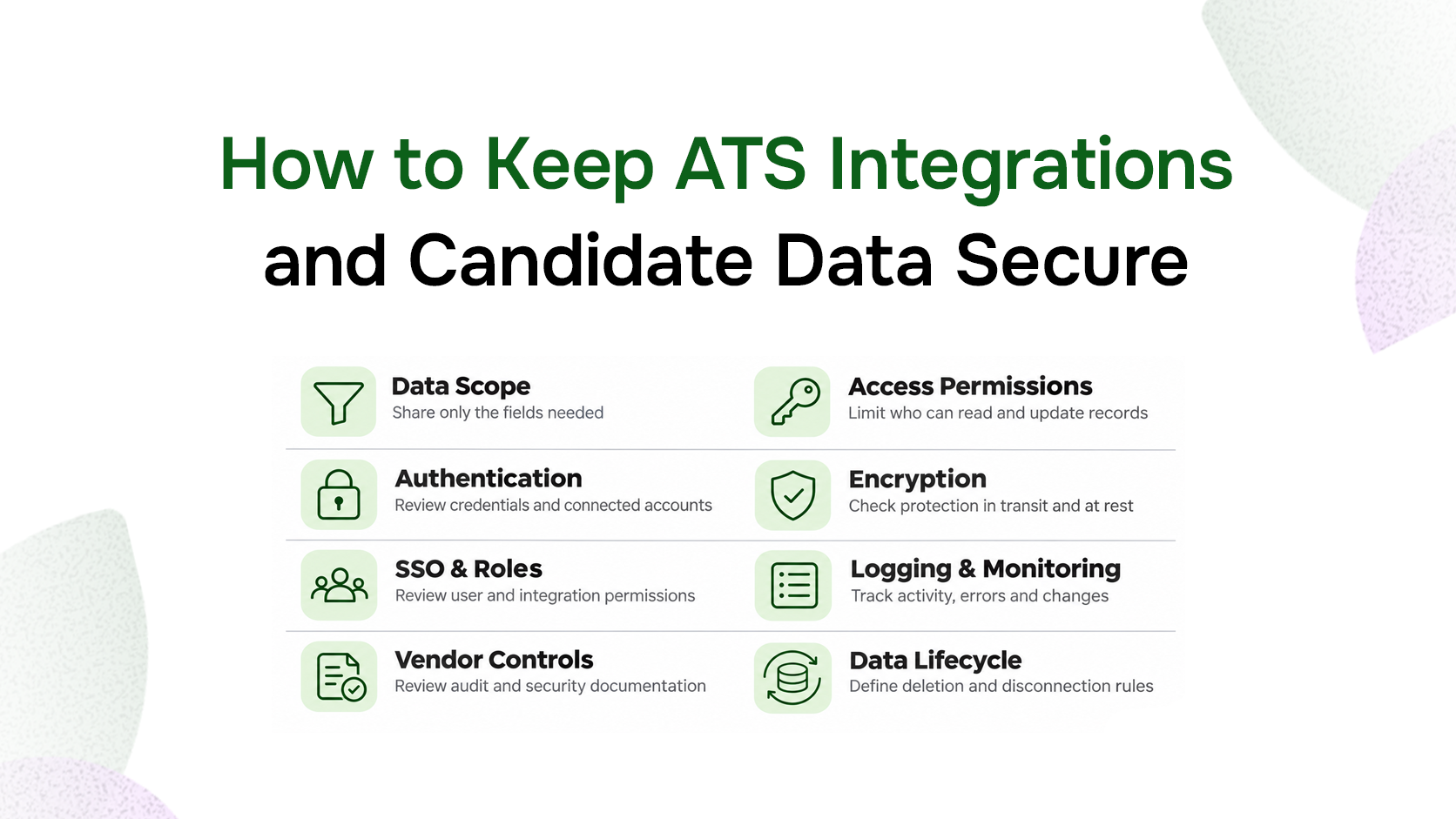
Every integration expands the path candidate information travels, so data security should be evaluated before the connection is activated, not after data has started moving between systems.
1. Control What Data Each Integration Can Access
Start by documenting what data the integration reads, writes, stores, and transfers.
A job-board connection does not require the same access as an HRIS or payroll connection, and each integration should receive only the permissions needed for its function.
This principle also applies to the data itself. Candidate and employee information should move only when the destination system requires it for a defined workflow.
2. Secure APIs, Webhooks, and Connected Accounts
When evaluating API and webhooks, ask how connections are authenticated, whether credentials can be rotated, what events are logged, how failures are monitored, and whether data is encrypted during transfer.
These considerations also matter when evaluating white label ATS platforms, where API access, integrations, permissions, and data ownership need to remain clearly defined even when the software is presented under another brand.
Palo Alto Networks' SOC 2 guidance specifically identifies encryption in transit and at rest, access controls, monitoring, and vendor management as relevant safeguards for sensitive information.
3. Understand SSO and SOC 2 When Evaluating Vendors
Single Sign-On (SSO) can strengthen access management by centralizing authentication, but it does not replace integration-level permissions.
Teams should still review which users, service accounts, APIs, and connected applications can access candidate records.
SOC 2 ( System and Organization Controls) also needs precise interpretation.
AICPA's Trust Services Criteria covers security, availability, processing integrity, confidentiality, and privacy for relevant systems and controls, while a SOC 2 report reflects an independent examination rather than a simple security badge.
For HRIS or payroll connections, the review deserves particular attention because those systems handle sensitive employee information.
Palo Alto Networks specifically identifies HR and payroll organizations as responsible for protecting the privacy and confidentiality of employee, payroll, and benefits information.
4. Use a Security Checklist Before Connecting Systems
Before activating an ATS integration, review how the connection will handle access, authentication, data movement, monitoring, and long-term data management.
A practical due-diligence check should cover:
Data scope: Which candidate or employee fields move between systems?
Access: Who and what services can read, create, or update records?
Authentication: Does the connection use appropriately secured authentication and support-controlled credential management?
Encryption: Is sensitive information protected in transit and at rest?
SSO and permissions: Can access be managed consistently across the organization?
Logging: Can administrators see integration activity, errors, and important changes?
Vendor controls: Does the provider offer relevant security documentation, audit information, and third-party risk controls?
Data lifecycle: What happens to transfer information when records are deleted, contracts end, or an integration is disconnected?
“Simply put, manufacturers must develop products that are secure by design rather than putting the burden of safety on customers.”— Bob Lord, Senior Technical Advisor, CISA
How to Prioritize Your First ATS Integrations
The best ATS integrations are not necessarily the most popular connectors in a marketplace; they are the connections that remove the most costly, repetitive, or fragile handoffs from your hiring process.
Rather than connecting your entire stack at once, prioritize each integration using a simple workflow-first approach.
Map the manual handoffs: Identify where recruiters copy information, download files, chase approvals, switch repeatedly between tools, or ask another team to recreate a record.
Measure the operational impact: Look at how frequently the handoff occurs, how much work it creates, how often information becomes inconsistent, and whether the delay affects candidates or hiring managers.
Start with the simplest reliable connection: Native ATS software connectors are usually easier to implement and maintain when they meet your requirements; move to a custom ATS API integration when prebuilt functionality cannot support the required workflow.
Define the source of truth: Decide which system owns each important record, and which direction information should travel before building the automation.
Review security and ownership: Assign responsibility for credentials, field mappings, failed syncs, permission changes, vendor updates, and ongoing monitoring instead of treating integration as a one-time project.
Your priorities will also depend on the hiring model. A company hiring permanent employees might place HRIS, payroll, and onboarding near the top.
While a recruitment agency or contingent-workforce team might prioritize a vendor management system (VMS), sourcing platforms, or client-facing workflows.
If you are also evaluating the platform itself, understanding how to choose an ATS helps you compare integration capabilities alongside your hiring volume, existing processes, security requirements, and plans for growth.
Conclusion
ATS integrations work best when they remove the repetitive tasks recruiters deal with every day, such as copying candidate details, updating the same status in multiple systems, or manually passing new-hire information to HR.
A well-connected workflow enables information to move to the right system at the right stage while keeping data ownership, permissions, and security clear.
Start with the handoff that creates the most manual work or delays for your team, whether that is job posting, offer management, background checks, or onboarding.
Once that connection is working reliably, expand your integration strategy step by step so every new connection solves a real hiring.
Put These Integrations to Work
Try Mercury Recruit free and test a connected hiring workflow.
Start Free TrialFAQs
Frequently Asked Questions
An ATS typically connects with job boards, sourcing platforms, HRIS and payroll systems, e-signature tools, background-check providers, communication platforms, assessment software, and onboarding tools.