
Applicant Tracking System: Features, Benefits, and How It Works
Recruit
applicant tracking system
14 min read
Key Highlights
An ATS is recruitment software that centralizes hiring activities, helping companies handle job postings, screening, interviews, and data from one platform to find the best candidate.
Modern ATS platforms offer features such as resume parsing, automation, interview scheduling, analytics, collaboration tools, and compliance management to improve hiring efficiency.
Popular ATS platforms such as Mercury Recruit, Greenhouse, Workable, Workday Recruiting, and BambooHR offer different features and capabilities.
Choose an ATS that matches your hiring needs, required features, budget, team workflow, and future growth plans.
To use an ATS effectively, set clear goals, customize workflows, train users, maintain clean data, and continuously improve your selection process.
Introduction
Hiring looks simple, but managing hundreds of applications is not. When resumes come from multiple sources, manually reviewing, organizing, and tracking candidates becomes time-consuming. This slows hiring, increases administrative work, and raises cost-per-hire.
That's why an Applicant Tracking System (ATS) is essential.
It automates resume collection, candidate screening, application tracking, and other repetitive hiring tasks, allowing organizations to hire up to 55% faster than those relying on manual hiring processes.
In this guide, you'll learn what an Applicant Tracking System is, how it works, its key features, benefits, examples, and how to choose the right ATS in 2026.
What is an Applicant Tracking System?
An Applicant Tracking System (ATS) is a recruitment software that manages and streamlines the hiring process. Instead of relying on spreadsheets, emails, or separate tools, recruiters use an ATS to handle talent acquisition activities from one platform.
It allows hiring managers to post jobs, collect applications, filter resumes, schedule interviews, track candidates' progress, share feedback, and create reports.
For candidates, it makes the application process more organized and easier. They apply online, receive updates, schedule interviews, and understand where they stand in the recruitment process.
Evolution of Applicant Tracking Systems
Before ATS systems were introduced, the hiring process was entirely paper based. Companies advertised jobs through newspapers and noticeboards, while candidates submitted printed resumes. Recruiters manually reviewed applications, maintained records, and contacted applicants through phone calls.
In the late 1990s, the first ATS software emerged as businesses began digitizing recruitment information. Early ATS platforms were completely different from modern systems. They were primarily on-premises solutions designed to store resumes electronically. Also, recruiters still had to manually review applications, enter candidate information, and identify qualified applicants, increasing selection time and costs.
With the rise of the internet in the 2000s, ATS technology entered a new phase. Global employment websites and online job boards made it easier to apply while for organizations to reach a wider talent pool. However, this also resulted in a significant increase in application volumes, making candidate selection more challenging.
As recruitment needs became more complex, ATS platforms evolved beyond basic resume storage by introducing features such as resume parsing, review, interview scheduling, workflow automation, reporting, and analytics.
Today, modern ATS platforms are cloud-based and increasingly powered by AI. They automate repetitive tasks, improve collaboration, generate insights, and integrate with other HR systems to support faster and more scalable workforce expansion.
How Does ATS Work?
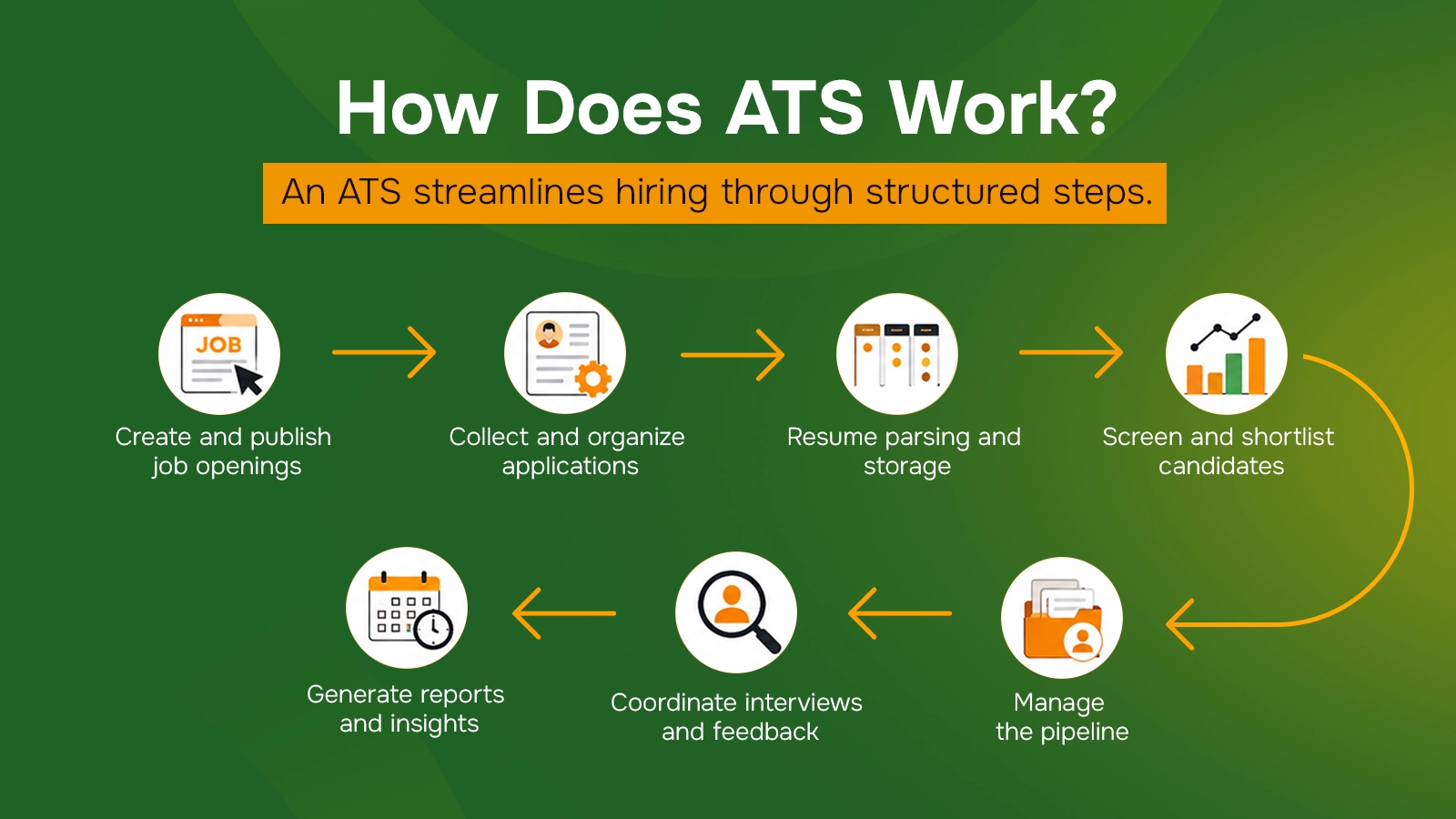
The applicant tracking system organizes the hiring workflow into a series of structured steps. Here's how a typical ATS works:
Create and publish job openings: Recruiters create job descriptions and publish them across career pages, job boards, and other channels.
Collect and organize applications: The ATS collects resumes and application details in one unified database.
Resume parsing and storage: The system extracts key details such as skills, education, work experience, certifications, and contact information and stores them into structured fields.
Screen and shortlist candidates: Recruiters filter applicants based on job requirements, keywords, experience, review questions, and required skills.
Manage the pipeline: Then, applicants are categorized in different stages such as applied, shortlisted, interview, offer, hired, or rejected.
Coordinate interviews and feedback: Recruiters schedule interviews, share details with the talent acquisition team, and collect notes or ratings after conducting interview.
Generate reports and insights: Organizations track metrics such as time to hire, application sources, applicant drop-off, and overall recruitment performance.
Each of these numbers tells a different story, see the 12-recruitment metrics that actually change hiring decisions.
Types of Applicants Tracking System
Applicant Tracking Systems (ATS) can be classified based on their intended users, system architecture and integration, deployment model, and the size of the organization they serve.
1. By Organizational User
In-house/Corporate ATS: Designed for companies to oversee employee selection for their own workforce. It improves the applicant experience and supports collaboration among HR teams and interviewers. Examples: Greenhouse, Workable.
Agency ATS: Helps staffing agencies to source candidates for multiple client organizations. Agency ATS supports multi-client hiring workflows and relationships management. Examples: Zoho Recruit, Bullhorn.
2. By Architecture and System Integration
Standalone ATS: Serves as an independent solution for managing applicants throughout the hiring process. It is suitable for organizations that prefer separate systems for recruitment workflow.
Embedded ATS: Integrated into a broader Human Capital Management (HCM) or Human Resource Information System (HRIS) platform that combines applicant tracking with other HR functions. It is ideal for organizations that want hiring and HR management in one system. Example: BambooHR
Unified Talent Platform ATS: Designed to manage the entire employee lifecycle, from hiring and onboarding to employee development and offboarding. It keeps all employee information and HR activities on one platform. Example: SAP
3. By Deployment Model
Cloud-Based (SaaS): Hosted by the vendor and accessed through a web browser. It offers lower upfront costs, automatic updates, scalability, remote accessibility, and vendor-controlled maintenance and security.
On-Premise ATS: Installed on the organization's own servers, on-premise ATS provides greater control over data, security, and system customization. However, it requires dedicated IT resources, regular maintenance, and higher infrastructure costs.
4. By Organization Size
Enterprise ATS: Designed for large organizations with high-volume hirings across multiple departments or locations. It offers advanced workflow automation, analytics, and integration with enterprise HR systems. Examples: Workday, iCIMS
SMB/Startup ATS: Designed for small and medium-sized businesses with less complex hiring needs. It emphasizes affordability, ease of use, and essential features. Example: JazzHR, Ava HR.
Picking between these tiers comes down to headcount, compare the best ATS for startups and the best ATS for small business before you shortlist.
Key Features of an Applicant Tracking System
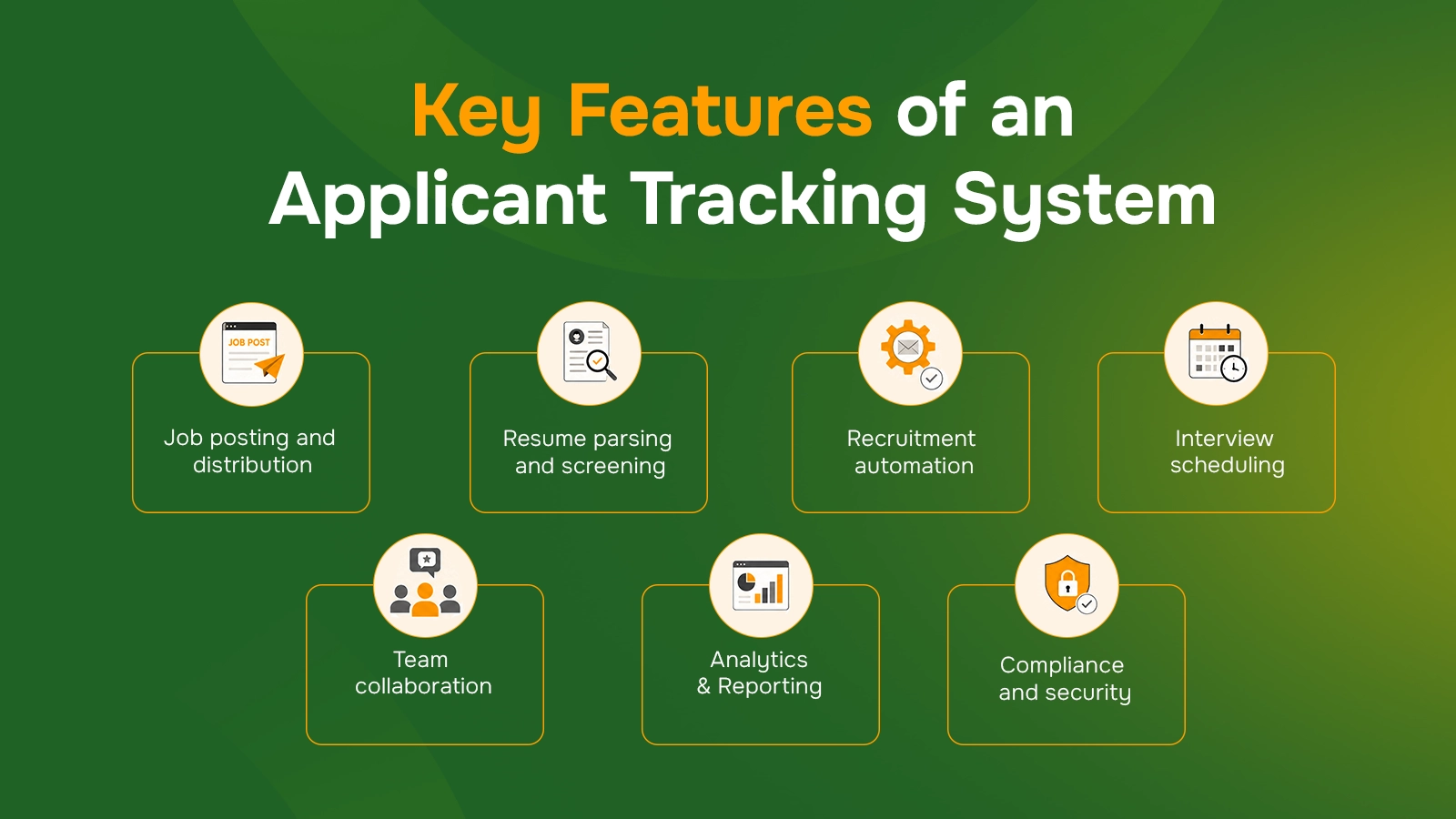
An ATS offers several key features, including job posting, application filtering, automation, and interview scheduling. These features improve recruitment process more efficiently.
Some of the major features commonly found in modern ATS platforms:
Job posting and distribution: An ATS allows recruiters to create and publish job openings across multiple job boards. HR can directly post on LinkedIn and Indeed from the system.
Resume parsing and screening: An ATS automatically extracts important information from resumes, such as skills, education, experience, and contact details. Plus, it categorizes resume on a standardized format, filters, and ranks applicants based on job requirements, keywords, and qualifications.
Recruitment automation: Recruitment automation is a process that handles repetitive tasks such as sending application updates, triggering emails, and automatically rejecting unqualified applicants based on predefined criteria.
Interview scheduling: ATS simplifies interview coordination by allowing candidates to schedule interviews through calendar integrations, reducing back-and-forth communication between recruiters and applicants.
Team collaboration: ATS allows recruiters to share feedback, interview scorecards, and ratings in real time while maintaining role-based access controls.
Analytics and reporting: Modern ATS provides insights by tracking important hiring metrics such as time-to-hire, cost-per-hire, candidate sources, and diversity compliance.
Compliance and security: An ATS ensures the protection of candidate data with General Data Protection Regulation (GDPR) compliance features such as consent management, access controls, data anonymization, and audit trails.
Explore These Features in Mercury Recruit
Bring jobs, candidates, interviews and team feedback together in one clear workspace.
Goto Mercury RecruitWhat are the Benefits of ATS?
An Applicant Tracking System simplifies and enhances the entire recruitment process. It reduces manual work, keeps the recruitment workflow organized, and moves candidates through the process more efficiently.
Faster hiring process: An ATS automates repetitive tasks such as multichannel job posting, filtering resumes on the basis of their resumes, and writing follow-up emails. Instead, you can invest time in other critical work like interviews and references.
Better candidate organization and tracking: An ATS stores applicant information in a centralized system, allowing efficient candidate pipeline management. It tracks progress and maintains visibility throughout the selection process.
Improved quality of hiring decisions: With features like resume parsing, applicant matching, and analytics, an ATS identifies candidates whose skills and experience align with job requirements.
Better collaboration and insights: Talent acquisition teams can share feedback, evaluate applicants, and collaborate during the selection process. It also provides data and reports on talent sourcing to refine future hiring strategies.
Improved candidate experience: An ATS simplifies applications, provides timely updates, and makes interview scheduling easier, reducing uncertainty throughout the selection process, and creating a positive impression of the company.
For detailed information on the advantages of using an ATS, check out our blog: Benefits of an Applicant Tracking System.
Who Uses an Applicant Tracking System?
Applicant Tracking Systems are widely used by businesses of all sizes and industries with different staffing needs. The right ATS lets organizations handle recruitment more efficiently, regardless of their application volume, team structure, or industry requirements.
1. ATS user by company size
Small businesses: Today, Startups and new businesses typically use a basic ATS to collect all job applications in one place instead of managing them through emails or spreadsheets. It mainly speeds up the workforce expansion and keeps basic information organized.
Mid-market companies: Mid-sized companies use a more advanced ATS to coordinate talent acquisition across multiple roles and people. It compares candidates, share feedback, and keeps the process structured when several positions are running at the same time.
Enterprises: Large enterprises rely on enterprise platforms with advanced automation, analytics, and integrations. They enforce structured hirings across departments and locations, automate workflows, and monitor performance at a scale.
2. ATS for Specific Industries
The use of ATS software varies across industries depending on their recruitment volume and hiring requirements. Here’s a brief look at how ATS is used in different industries:
Healthcare: Health institutions often hire urgent and regulated positions. ATS for healthcare focuses on certifications, licenses, and compliance requirements. E.g. Eploy.
Technology and software: Tech companies use ATS to evaluate candidates based on technical skills, review coding assessment results, and identify qualified talent for engineering and software development roles.
Staffing and recruitment agencies: Staffing agencies use ATS software to handle high-volume hiring for multiple clients at the same time. They also use it to post jobs across multiple job boards, schedule interviews, track candidate submissions, and manage client approvals in one system
Manufacturing and logistics: ATS is used to support high-volume and shift-based hiring. It screens candidates’ resumes based on required skills and conducts background checks.
Best Applicant Tracking Systems in 2026
Here are the top 5 ATS platforms in 2026, recognized for their features, integrations, and capabilities.
1. Mercury Recruit by Mercury360
Mercury Recruit is one of the best cloud-based ATS for businesses seeking an affordable yet feature-rich recruitment platform. It is an emerging platform that includes AI-assisted job creation, reusable job templates, configurable hiring pipelines, and AI-powered screening to identify suitable applicants faster.
Additionally, recruiters can automate communication, perform bulk actions, and manage applicants through List or Kanban views. Teams can track applicant progress and collaborate from a single platform while using built-in skills assessments to evaluate capabilities.
Furthermore, Mercury Recruit supports talent pool management, helping organizations build a pipeline for future hires. It also integrates with job boards and HR tools to streamline workflows. With transparent and scalable pricing, the platform can support businesses of different sizes.
Key Features:
AI-powered candidate screening and matching
Built-in skills assessments
Talent pool management
Analytics and reporting
Role-based permissions
Integrations with job boards and HR systems
2. Greenhouse
Greenhouse is a leading enterprise application tracking system known for its structured hiring. It supports collaboration with interview tools, potential candidate matching, fraud detection, identity verification, an applicant portal, and a large integration ecosystem.
What sets Greenhouse apart is its Greenhouse Real Talent™ suite, which includes fraud detection, identity verification, and intelligent talent matching. It also offers AI-powered interview support through Voice AI and automatic note-taking tools.
3. Workable
Workable is among the best ATS for small businesses. It features AI-powered agents, no-code careers page builders, interview scheduling, and recruitment analytics.
One of Workable’s strong points is its candidate sourcing suite and job board distribution. Recruiters can publish jobs across multiple channels and use AI-powered tools to find suitable employees faster.
4. Workday
Workday is another top ATS for midsize and large enterprises that already use, or plan to use, the Workday HCM ecosystem. It connects hiring with workforce planning, employee data, onboarding, and HR management on one platform.
Workday Recruiting includes AI-powered scheduling, configurable workflows, team collaboration tools, user experience, and talent analytics.
5. BambooHR
BambooHR is an all-in-one HR platform with a built-in ATS, making it a top ATS for startups and mid-sized businesses.
Beyond hiring, BambooHR supports employee self-service, Paid Time Off (PTO) tracking, e-signatures, payroll, and employee feedback surveys. This makes it useful for companies that want to organize the full employee lifecycle, from application to onboarding and ongoing HR operations.
How to Choose an Applicant Tracking System?
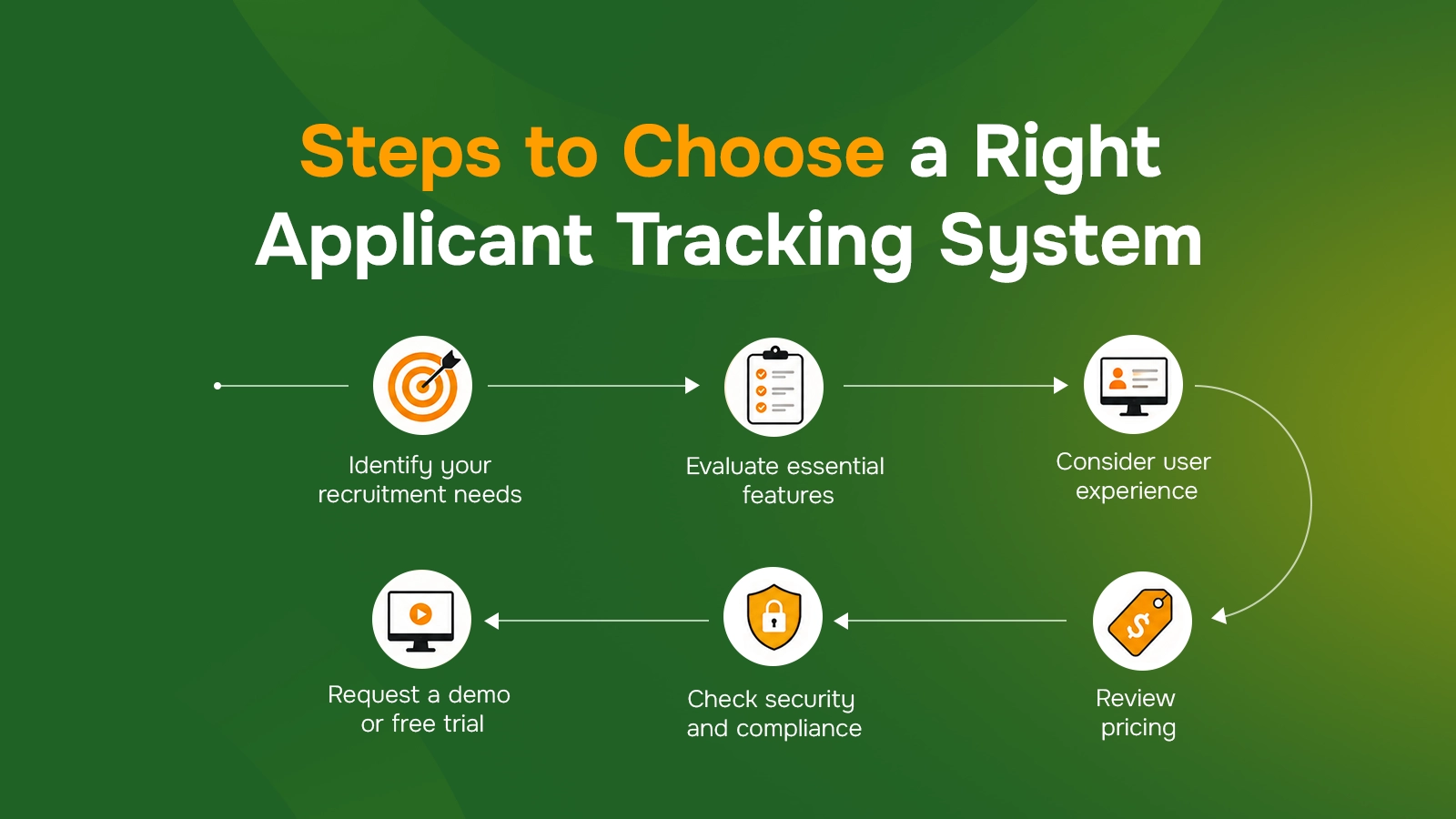
Choosing the right Applicant Tracking System (ATS) depends on your hiring needs, budget, and business goals. Here are a few tips to help you make the right choice.
Identify your recruitment needs: Assess your volume, company size, and recruitment challenges. Choose an ATS that aligns with your current needs and future growth.
Evaluate essential features: Look for features such as resume parsing, progress tracking, interview scheduling, and reporting. Also, ensure that the platform supports your workflows and is compatible with existing systems.
Consider user experience: Choose an ATS with a simple interface and easy navigation. A user-friendly system strengthens adoption and recruiter productivity.
Review pricing: Compare ATS pricing models and check what each package includes. Watch for additional costs such as setup, integrations, or support.
Check security and compliance: Ensure the ATS protects applicant’s data with strong security measures. It should also comply with relevant data privacy regulations.
Request a demo or free trial: Test shortlisted ATS platforms before making a decision. Evaluate usability, features, compatibility, and overall fit for your hiring requirements.
For a detailed selection guide, check out: How to Choose an ATS.
Put Your ATS Shortlist to the Test
See how Mercury Recruit compares on the features that matter most to your team.
Open Mercury RecruitBest Practices for Implementing and Using an ATS
An ATS makes recruitment more efficient; however, its success depends on how effectively it is used.
Here are some of the best practices that can help teams use ATS more effectively.
Set clear goals first: Identify what you want the ATS to fix, such as slow identifications, scattered candidate data, or poor visibility. Then, choose the setup and features that match those needs.
Customize it to your hiring process: Set up progress stages, workflows, approval steps, and notifications based on how your team hires to make the system easier to use and more useful for daily recruitment.
Train your hiring team: Show recruiters and HR teams how to update future hires, share feedback, and use key features to maintain consistency.
Keep data clean: Update records regularly, remove duplicates, and use consistent labels or stages. As a result, reports become more accurate, and searches become easier.
Use automation carefully: Automate repetitive tasks like interview reminders and status updates. However, send personal follow-ups for important stages such as interviews, rejections, and offers to build smooth relationships with candidates.
Track hiring performance: Review metrics such as time-to-hire, source performance, and candidate drop-off. Then, use the data to enhance your recruitment workflows over time.
Protect candidate information: Set role-based access and limit sensitive information to the right users. Also, follow data protection rules to keep records secure.
Automate the repetitive stages first, our comparison of recruitment automation software shows what each tool actually automates.
Turn Your ATS Decision Into Faster Hires
Automate repeatable work while recruiters focus on conversations that move candidates forward.
Book a DemoConclusion
An Applicant Tracking System has become essential in modern recruitment, helping businesses streamline and organize the hiring process. It automates tasks such as application filtering, interview scheduling, candidate tracking, and other staffing activities. The right ATS should align with your company size, volume, industry, budget, and long-term goals.
FAQs
Frequently Asked Questions
An Applicant Tracking System (ATS) is used to streamline hiring by managing job postings, applications, candidate evaluation, interviews, and recruitment data on one unified platform.